

在模仿easyui的dataGrid表格插件的同时,自己去封装了一个。实现了基本的json数据的动态加载,自动分页,全选全不选,鼠标悬浮变色,隔行变色等
由于涉及到ajax访问,所以必须部署到iis上才能看出效果,先给大家看一下效果图:
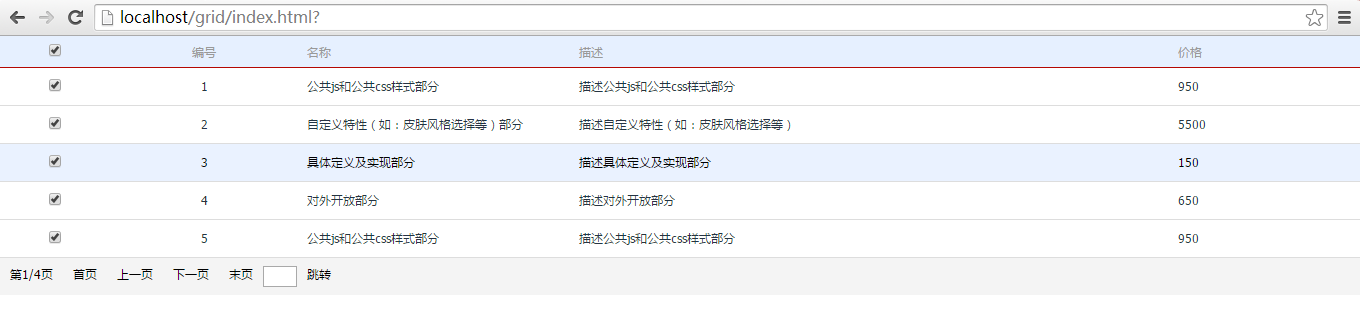
css样式
/* CSS Document */
body {
font: 14px/1.43 “Helvetica Neue”, Tahoma, “Microsoft YaHei”, Arial;
color: #253443;
margin: 0 auto;
padding: 0 auto;
}
table {
border-collapse: collapse;
border-spacing: 0;
background: #FFF;
font-size: 12px;
width: 100%;
border: 1;
width: 100%;
}
thead {
display: table-header-group;
vertical-align: middle;
border-color: inherit;
}
tr {
display: table-row;
vertical-align: inherit;
border-color: inherit;
}
table thead tr {
background-color: #E6F0FF;
}
table thead tr th {
padding: 5px 8px;
font-weight: normal;
color: #999;
border-bottom: 1px solid #B50802;
vertical-align: bottom;
line-height: 20px;
}
tbody {
display: table-row-group;
vertical-align: middle;
border-color: inherit;
}
table tbody tr td {
padding: 8px;
border-top: 0px;
border-bottom: 1px solid #DDD;
vertical-align: middle;
line-height: 20px;
}
table tfoot tr td {
width: 100%;
background-color: #F4F4F4;
height: 20px;
padding: 8px 0px;
color: #000;
}
table tfoot tr td input {
width: 30px;
float: left;
}
table tfoot tr td span {
display: inline-block;
cursor: pointer;
height:20px;
padding:0 10px;
float: left;
}
.mouseover {
background-color: #EAF2FF;
color: #000;
}
JSON文件
{
“total”:16,
“rows”: [
{
“ID”: 1,
“name”: “公共js和公共css样式部分”,
“descrtion”:”描述公共js和公共css样式部分”,
“Price”: 950
},
{
“ID”: 2,
“name”: “自定义特性(如:皮肤风格选择等)部分”,
“descrtion”:”描述自定义特性(如:皮肤风格选择等)”,
“Price”: 5500
},
{
“ID”: 3,
“name”: “具体定义及实现部分”,
“descrtion”:”描述具体定义及实现部分”,
“Price”: 150
},
{
“ID”: 4,
“name”: “对外开放部分”,
“descrtion”:”描述对外开放部分”,
“Price”: 650
},
{
“ID”: 5,
“name”: “公共js和公共css样式部分”,
“descrtion”:”描述公共js和公共css样式部分”,
“Price”: 950
},
{
“ID”: 6,
“name”: “匹配所有大于给定索引值的元素”,
“descrtion”:”描述匹配所有大于给定索引值的元素”,
“Price”: 5500
},
{
“ID”: 7,
“name”: “查找第二第三行,即索引值是1和2,也就是比0大”,
“descrtion”:”描述查找第二第三行,即索引值是1和2,也就是比0大”,
“Price”: 150
},
{
“ID”: 8,
“name”: “从 0 开始计数”,
“descrtion”:”从 0 开始计数”,
“Price”: 650
},
{
“ID”: 9,
“name”: “公共js和公共css样式部分”,
“descrtion”:”描述公共js和公共css样式部分”,
“Price”: 950
},
{
“ID”: 10,
“name”: “自定义特性(如:皮肤风格选择等)部分”,
“descrtion”:”描述自定义特性(如:皮肤风格选择等)”,
“Price”: 5500
},
{
“ID”: 11,
“name”: “具体定义及实现部分”,
“descrtion”:”描述具体定义及实现部分”,
“Price”: 150
},
{
“ID”: 12,
“name”: “对外开放部分”,
“descrtion”:”描述对外开放部分”,
“Price”: 650
},
{
“ID”: 13,
“name”: “公共js和公共css样式部分”,
“descrtion”:”描述公共js和公共css样式部分”,
“Price”: 950
},
{
“ID”: 14,
“name”: “匹配所有大于给定索引值的元素”,
“descrtion”:”描述匹配所有大于给定索引值的元素”,
“Price”: 5500
},
{
“ID”: 15,
“name”: “查找第二第三行,即索引值是1和2,也就是比0大”,
“descrtion”:”描述查找第二第三行,即索引值是1和2,也就是比0大”,
“Price”: 150
},
{
“ID”: 16,
“name”: “从 0 开始计数”,
“descrtion”:”从 0 开始计数”,
“Price”: 650
}
]
}
jquery代码
// JavaScript Document
$(function () {
var dataGrid = function (ele, opt) {
this.defaults = {
//id
id: “”,
//请求url
url: null,
//表头格式
columns: null,
//是否分页
pagination: false,
//是否隔行变色
isoddcolor: false,
//是否搜索栏
searchnation:false,
//页显示
pagesize: 5,
//页索引
pageindex: 1,
//总页数
totalpage: null
}
this.settings = $.extend({}, this.defaults, opt);
}
dataGrid.prototype = {
_id:null,
_op:null,
init: function () {
this._id=this.settings.id;
_op=this;
this.create();
this.bindEvent();
},
create: function () {
//初始化元素
this.InitializeElement();
//初始化表头
this.createTableHead();
//初始化动态行
this.createTableBody(1);
//初始化搜索框
//if(this.settings.searchnation) this.createsearchbox();
//选择是否分页
if (this.settings.pagination) this.createTableFoot();
},
bindEvent: function () {
//添加上一页事件
this.registerUpPage();
//添加下一页事件
this.registerNextPage();
//添加首页事件
this.registerFirstPage();
//添加最后一页事件
this.registerlastPage();
//添加跳转事件
this.registerSkipPage();
//添加鼠标悬浮事件
this.registermousehover();
//添加隔行变色
this.registerchangebgcolor();
//添加全选全不选事件
this.registercheckall();
},
//初始化元素
InitializeElement: function () {
//var id = this.settings.id;
$(“#” this._id).empty().append(“
© 版权声明
文章版权归作者所有,未经允许请勿转载。
相关文章





暂无评论...